Introduction
Have you ever wondered what actually happens when you click the Play button on an IPTV channel? Within just a few seconds, your favorite TV show, live sports event, or movie starts playing smoothly on your screen. But behind that simple action is a fascinating technology that works incredibly fast.
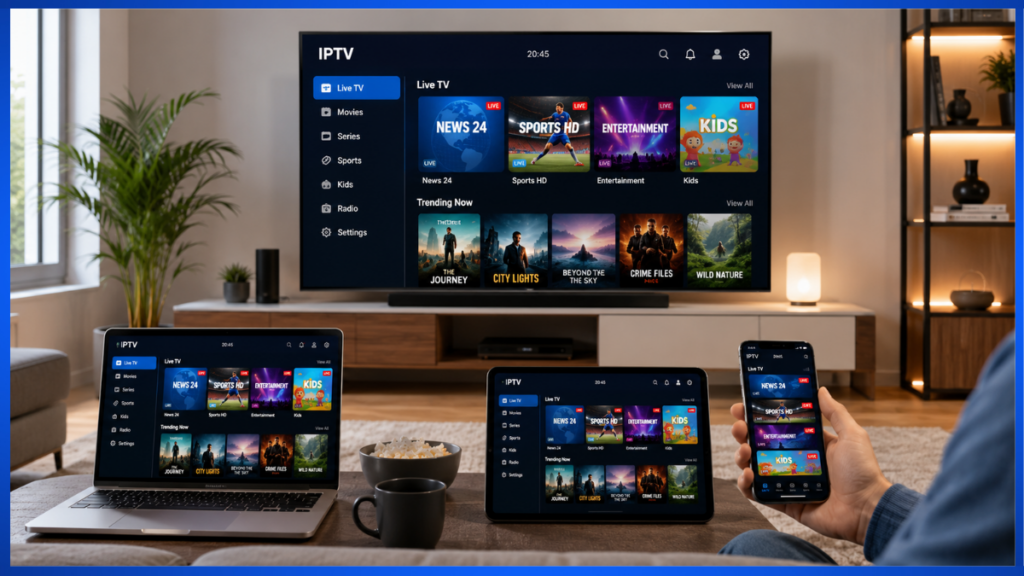
Unlike traditional cable or satellite television, IPTV (Internet Protocol Television) delivers video content through an internet connection instead of broadcasting it through cables or satellites. This modern technology allows viewers to enjoy live television, on-demand movies, TV series, and even recorded programs on various devices such as Smart TVs, smartphones, tablets, computers, and streaming boxes.
The growing popularity of IPTV is no surprise. Millions of people around the world are switching to IPTV because it offers greater flexibility, more content choices, and the convenience of watching programs whenever and wherever they want.
However, many beginners still ask an important question:
“How does IPTV actually work?”
The answer is much simpler than most people think.
In this guide, we'll explain the entire IPTV process in plain English. We'll walk you through every step—from pressing the Play button to receiving high-quality video on your screen—without using confusing technical jargon.
By the end of this article, you'll understand:
- How IPTV delivers video over the internet
- What IPTV servers actually do
- How streaming works behind the scenes
- Why buffering happens
- What internet speed you need
- The difference between Live TV and Video on Demand
- Which devices support IPTV
Let's begin with the very first step.
What Happens When You Press “Play”?
Most people think pressing the Play button instantly starts the video.
In reality, several different systems begin working together within milliseconds.
Let's imagine you're opening your IPTV app and selecting a live football match.
From your perspective, you simply:
- Open the IPTV application.
- Choose a channel.
- Press Play.
- The video starts.
Behind the scenes, however, your IPTV service performs a sequence of actions almost instantly.
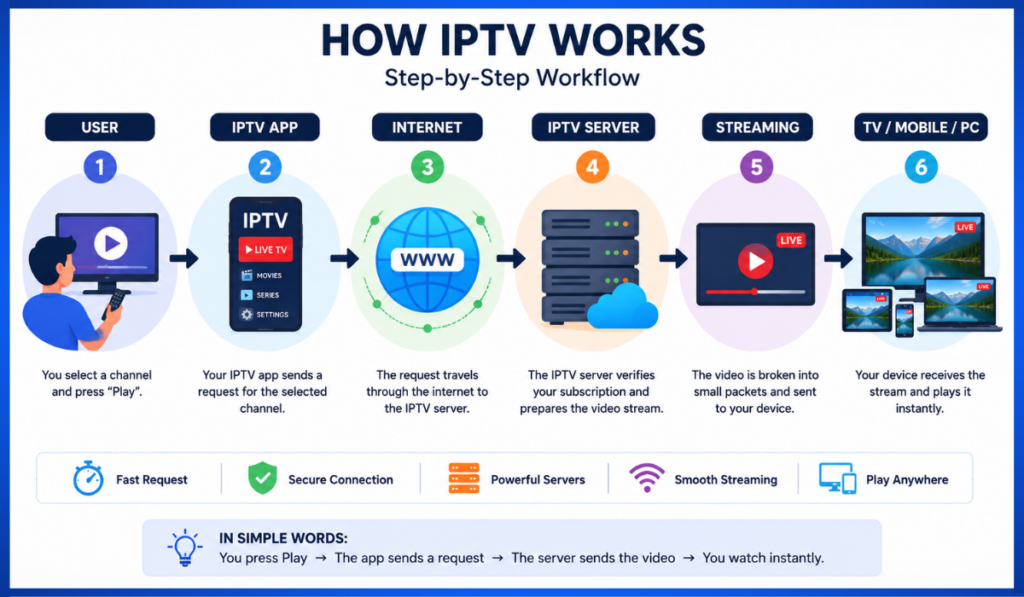
Step 1: Your Device Sends a Request
The moment you press Play, your IPTV app sends a request over your internet connection.
This request includes information such as:
- Which channel you selected
- Your account authorization
- Device information
- Streaming quality preference
Think of it like ordering food from a restaurant.
Instead of walking into the kitchen yourself, you send your order to the restaurant.
Your IPTV app works the same way—it tells the IPTV server exactly which content you want.
Step 2: The IPTV Server Receives
Your Request The IPTV provider operates powerful servers that store or manage thousands of television channels and videos.
Once the server receives your request, it checks several things:
- Is your subscription active?
- Are you allowed to access this channel?
- Which streaming quality is best for your internet speed?
- Which server is currently the fastest?
If everything checks out, the server prepares your video stream.
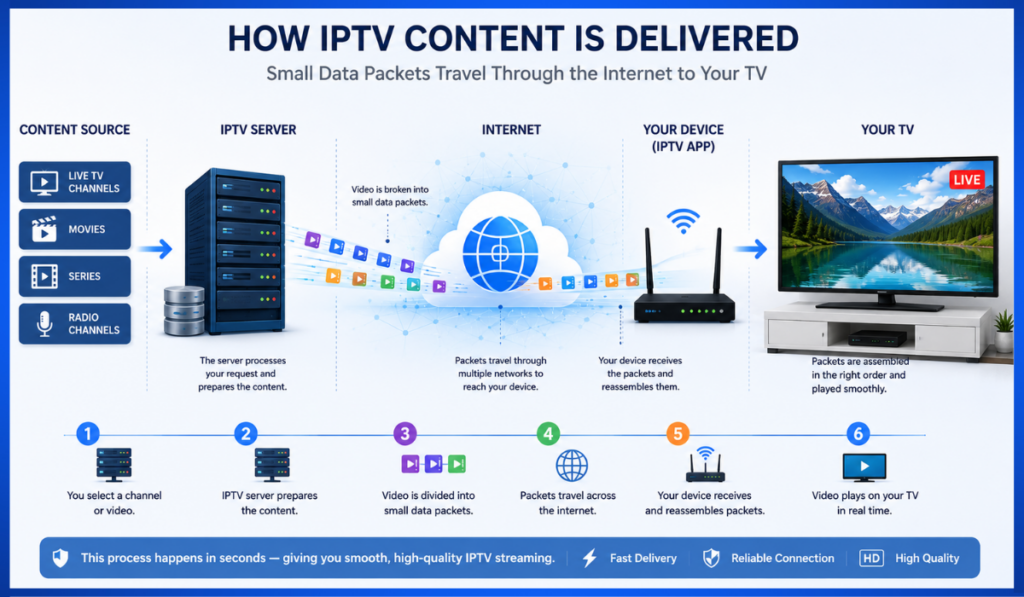
Step 3: The Video Is Broken into Small Pieces
Instead of sending one huge video file, IPTV divides the video into thousands of tiny data packets.
Imagine sending a 500-page book.
Rather than mailing the entire book in one massive package, you send each page separately.
When all the pages arrive, they are automatically placed back in the correct order.
IPTV uses the same concept.
Thousands of tiny packets travel across the internet simultaneously.
Your IPTV app reassembles them instantly, creating smooth video playback.
Step 4: The Data Travels Across the Internet
The packets travel through your Internet Service Provider (ISP).
Along the way, they pass through multiple networking devices called routers.
Each router helps direct the packets toward your home internet connection.
This entire journey usually takes only a fraction of a second.
Step 5: Your IPTV App Displays the Video
When enough video packets arrive, your IPTV player begins decoding them.
Decoding simply means converting digital information into video and audio that humans can watch and hear.
Modern IPTV apps perform this process continuously.
While you're watching the current few seconds of video, the app is already downloading the next few seconds in the background.
This creates uninterrupted playback.
A Simple Real-Life Analogy
Imagine you're watching a live cricket match at a stadium.
The camera records every moment.
Instead of sending the entire match after it ends, the camera sends every second of the game immediately.
Those video signals travel through the internet.
Your IPTV provider receives them.
The provider processes the stream.
The stream is then forwarded to your IPTV player.
Your device displays each frame almost instantly.
The entire process happens so quickly that you experience the event in real time, even though thousands of technical operations occur behind the scenes.
The IPTV Streaming Journey
To summarize, here's the complete journey from pressing Play to watching your content:
- You select a channel.
- Your IPTV app sends a request.
- The IPTV server verifies your subscription.
- The server prepares the video stream.
- The video is divided into tiny packets.
- Those packets travel through the internet.
- Your IPTV player receives them.
- The player decodes the data.
- Your video begins playing smoothly.
Although it sounds like a long process, all of these steps happen in less than a second on a good internet connection.
Internet Connection: Why It Matters
One of the biggest differences between IPTV and traditional television is that IPTV relies entirely on an internet connection. Unlike cable TV, which uses coaxial cables, or satellite TV, which depends on signals from satellites in space, IPTV delivers video content through your internet service.
Think of your internet connection as a highway. The wider and smoother the highway, the more traffic it can handle without delays. In the same way, a fast and stable internet connection allows video data to travel quickly from the IPTV provider's servers to your device.
Why a Stable Internet Connection Is More Important Than Raw Speed
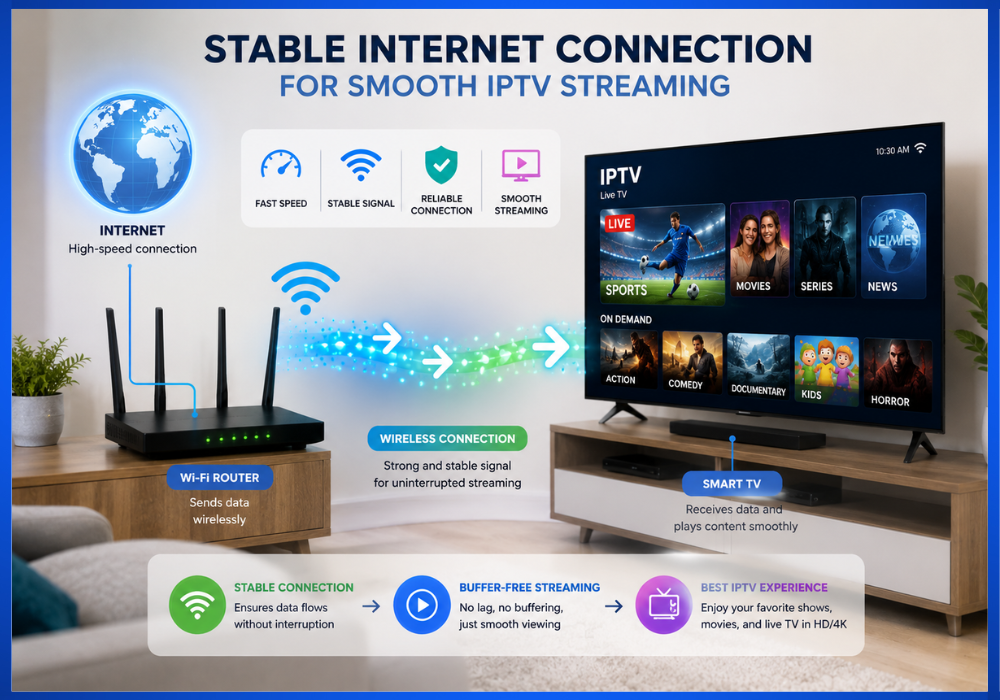
Many people believe they need the fastest internet plan available to enjoy IPTV. While speed is important, connection stability is often even more critical.
For example:
- A 30 Mbps connection that remains stable all day will usually provide a better viewing experience than a 100 Mbps connection that frequently disconnects.
- Sudden drops in speed can interrupt streaming and cause buffering.
- High latency or packet loss may lead to frozen screens, delayed audio, or lower video quality.
A reliable connection helps ensure that data packets arrive in the correct order and on time, resulting in smoother playback.
What Affects IPTV Performance?
Several factors influence how well IPTV works:
- Internet speed: Determines how much video data your connection can download each second.
- Network congestion: Heavy internet usage in your home can reduce available bandwidth.
- Wi-Fi signal strength: Weak signals can cause interruptions, especially if you're far from the router.
- Router quality: Older routers may struggle with high-definition streaming.
- Internet Service Provider (ISP): Some providers offer more consistent performance than others.
Tips for Better IPTV Streaming
To improve your viewing experience:
- Use a wired Ethernet connection whenever possible.
- Place your Wi-Fi router in a central location.
- Restart your router occasionally to maintain performance.
- Reduce the number of devices using the internet while streaming.
- Keep your IPTV app and streaming device updated.
These simple steps can help minimize interruptions and improve overall streaming quality.
How IPTV Servers Store and Deliver Content
After your device sends a request, the next stop is the IPTV provider's servers.
You can think of an IPTV server as a large digital library. Instead of books, it stores television channels, movies, TV shows, documentaries, and other video content. When you request a specific program, the server quickly locates it and begins delivering it to your device.
What Is an IPTV Server?
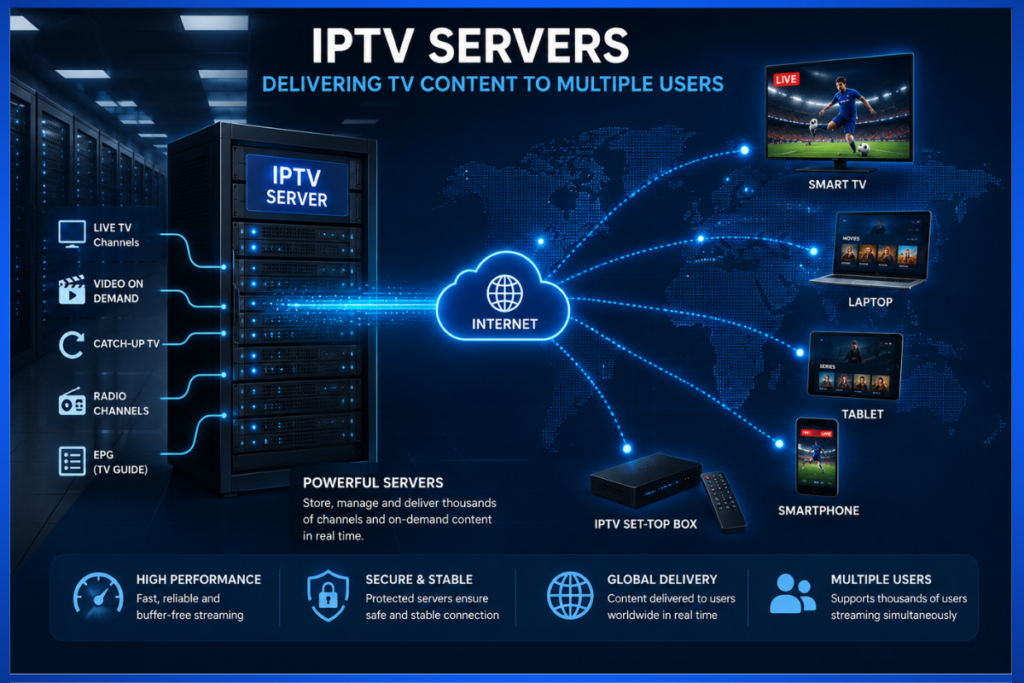
An IPTV server is a powerful computer designed to process thousands—or even millions—of streaming requests at the same time.
Depending on the provider, servers may handle:
- Live television broadcasts
- Video on Demand (VOD)
- Catch-up TV
- Recorded programs
- Radio channels
- Electronic Program Guides (EPGs)
Large IPTV providers often use multiple servers located in different regions around the world. This helps reduce delays and ensures viewers receive content from the nearest available location.
How Does the Server Respond?
When you select a channel, the server performs several tasks in just a fraction of a second:
- Confirms that your subscription is active.
- Check whether you have permission to access the selected content.
- Find the requested video or live stream.
- Choose the best server based on your location and network conditions.
- Starts sending the video in small data segments.
This process happens automatically, allowing your video to begin almost immediately.
Why Multiple Servers Matter
Imagine a popular sporting event being watched by hundreds of thousands of people simultaneously.
If only one server handled every viewer, it could become overloaded and slow down.
To prevent this, many IPTV providers distribute viewers across multiple servers or use Content Delivery Networks (CDNs). This spreads the workload and helps maintain smooth streaming even during peak viewing times.
Content Delivery Explained in Simple Terms
Once the IPTV server prepares your content, it must deliver the video efficiently over the internet.
Rather than sending an entire movie or TV show as one massive file, IPTV streams it gradually while you watch.
Think of It Like Drinking Water Through a Straw
Imagine drinking water through a straw.
You don't drink the whole glass at once. Instead, the water flows continuously in small amounts.
IPTV works in a similar way.
Instead of downloading a complete movie before playback begins, the video is sent in a steady stream of small pieces called data packets.
As each packet arrives, your IPTV app immediately processes and displays it.
This allows you to start watching almost instantly instead of waiting for the entire file to download.
Why Is Streaming Better Than Downloading?
Streaming offers several advantages:
- Faster playback with little waiting time.
- Lower storage requirements because videos aren't permanently saved to your device.
- Better use of internet bandwidth.
- Automatic adjustment of video quality based on your connection speed.
- Convenient access to live TV and on-demand content.
This is why streaming has become the standard method for delivering digital entertainment.
What Happens If Some Packets Arrive Late?
Sometimes internet traffic slows down or experiences brief interruptions.
When this happens, your IPTV player uses a temporary storage area called a buffer.
The buffer stores a few seconds of upcoming video, allowing playback to continue even if some data arrives slightly later than expected.
If the delay lasts too long and the buffer runs out, the video pauses while more data is downloaded. This is known as buffering, which we'll explore in more detail later in this article.
Streaming Protocols (HLS, MPEG-DASH, RTSP) Made Easy
At this point, you might be wondering how your device knows how to receive and play the incoming video.
This is where streaming protocols come into play.
A streaming protocol is a set of rules that tells devices and servers how to exchange video data efficiently.
Think of it like a common language that both sides understand.
Several protocols are commonly used in IPTV.
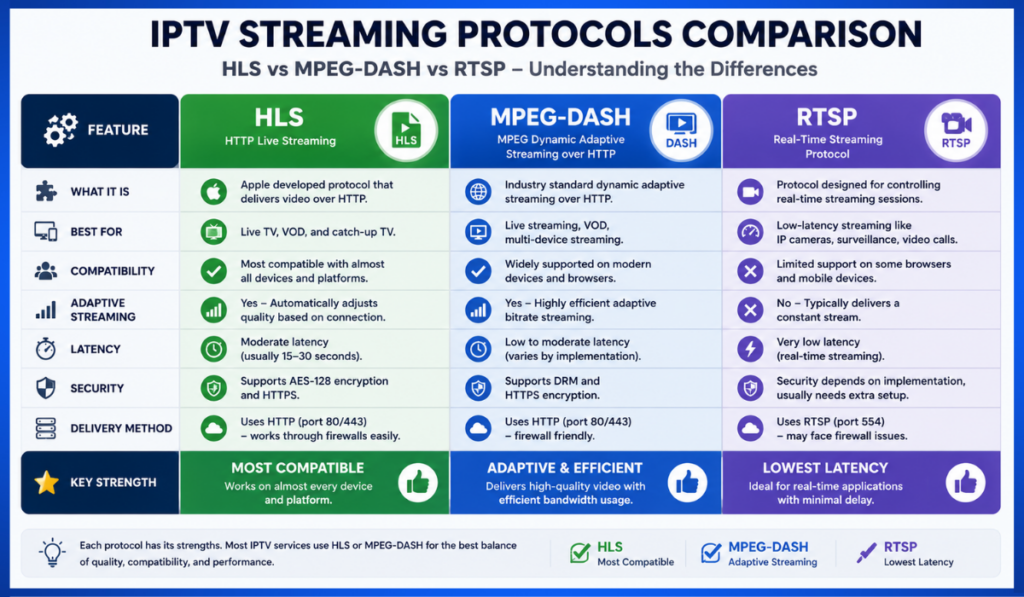
HLS (HTTP Live Streaming)
HLS was developed by Apple and is one of the most widely used streaming protocols today.
It divides videos into small segments and delivers them over standard web servers.
Advantages of HLS
- Works on almost every modern device.
- Adjusts video quality automatically based on your internet speed.
- Reliable for live TV and Video on Demand.
- Compatible with most IPTV applications and Smart TVs.
Because of its flexibility and broad support, many IPTV providers rely on HLS for everyday streaming.
MPEG-DASH MPEG-DASH
(Dynamic Adaptive Streaming over HTTP) is another popular streaming standard.
Like HLS, it splits video into small segments and can automatically adjust video quality according to your internet connection.
Benefits of MPEG-DASH
- High streaming efficiency.
- Supports adaptive bitrate streaming.
- Compatible with many smart devices and web browsers.
- Delivers high-quality video with reduced buffering.
Many modern streaming platforms use MPEG-DASH because it performs well across different devices and varying network conditions.
RTSP (Real-Time Streaming Protocol)
RTSP is commonly used for applications that require very low latency, such as:
- Security cameras
- Video conferencing
- Live surveillance
- Certain IPTV systems
Unlike HLS and MPEG-DASH, RTSP focuses on delivering video with minimal delay rather than maximizing compatibility.
While it isn't as widely used for consumer IPTV today, it remains important for specialized real-time streaming applications.
Which Streaming Protocol Is Best?
There isn't a single “best” protocol for every situation.
Each one has strengths depending on the type of content and the devices being used.
Protocol Best For Main Advantage
HLS- Live TV and Video on Demand- Excellent compatibility and adaptive streaming
MPEG-DASH- High-quality streaming- Efficient performance across many devices
RTSP- Real-time applications- Very low latency for live communication
Most IPTV users don't need to choose a protocol manually. The IPTV service and application usually select the most appropriate option automatically.
Live TV vs Video on Demand (VOD)
One of the biggest advantages of IPTV is that it gives you more than one way to enjoy content. Most IPTV services offer Live TV and Video on Demand (VOD), allowing viewers to choose how they want to watch.
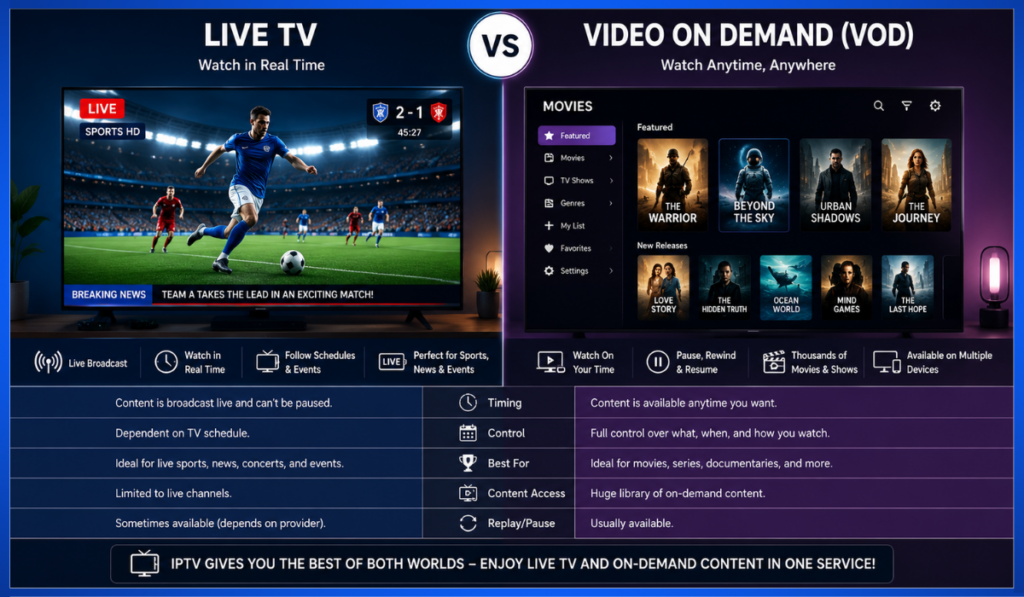
Although both use internet streaming technology, they serve different purposes.
What Is Live TV?
Live TV lets you watch programs as they are being broadcast in real time. It works much like traditional cable or satellite television, but instead of using broadcast signals, IPTV delivers the stream over the internet.
Popular examples of Live TV include:
- News channels
- Live sports events
- Music channels
- Entertainment channels
- Children's programming
- Religious broadcasts
When you tune into a live football match or a breaking news report, you're watching the same broadcast as thousands of other viewers at the same time.
Benefits of Live TV
- Watch events as they happen.
- Access hundreds or even thousands of channels.
- Great for sports, news, and live entertainment.
- Similar viewing experience to traditional television.
What Is Video on Demand (VOD)?
Video on Demand allows you to choose exactly what you want to watch and when you want to watch it.
Instead of following a TV schedule, you browse a library of available content and press Play whenever you're ready.
Examples include:
- Movies
- TV series
- Documentaries
- Educational videos
- Children's shows
- Recorded programs
This flexibility has made VOD one of the most popular features of modern IPTV services.
Benefits of Video on Demand
- Watch anytime.
- Pause and resume at your convenience.
- Rewind or fast-forward easily.
- No need to wait for scheduled broadcasts.
Live TV vs Video on Demand: Quick Comparison
Feature Live TV Video on Demand
Broadcast Time- Real-time- Anytime
Viewer Control- Limited- Full control
Best For- Sports, News, Live Events- Movies, TV Shows, Learning
Pause/Rewind – Sometimes- Usually Yes
Fixed Schedule- Yes- No
Many IPTV providers include both Live TV and VOD in a single subscription, giving users the flexibility to switch between live broadcasts and on-demand entertainment.
Buffering Explained
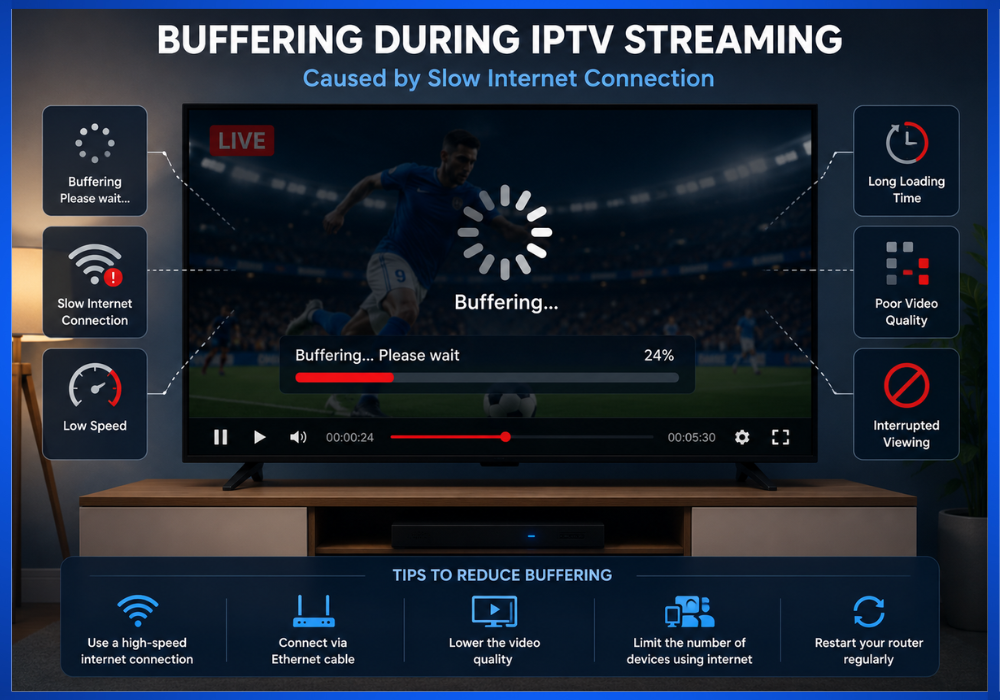
If you've ever watched an IPTV stream that suddenly paused to load, you've experienced buffering.
Buffering is one of the most common concerns among IPTV users, but understanding why it happens can help you reduce or even prevent it.
What Is Buffering?
Buffering occurs when your IPTV player temporarily stores a small portion of video before playing it.
Think of it as filling a small cup with water before drinking. As long as the cup stays full, you can drink continuously.
If the water enters the cup more slowly than you're drinking it, you'll eventually have to wait for it to refill.
IPTV works the same way.
Your device continuously downloads small video segments ahead of playback. If data arrives too slowly, the buffer empties, causing the video to pause until more data is received.
Common Causes of Buffering
Several factors can contribute to buffering:
- Slow internet speeds.
- Unstable Wi-Fi connections.
- Network congestion during peak hours.
- Overloaded IPTV servers.
- Too many devices sharing the same network.
- Outdated IPTV apps or streaming devices.
Sometimes the issue is with your home network, while in other cases it may be related to the IPTV provider's infrastructure.
How to Reduce Buffering
Although buffering can't always be eliminated completely, these practical steps often improve streaming performance:
- Use a wired Ethernet connection whenever possible.
- Restart your router regularly.
- Move closer to your Wi-Fi router if using wireless internet.
- Close unnecessary downloads or streaming apps running on other devices.
- Keep your IPTV app updated.
- Choose a lower video quality if your internet connection is limited.
A combination of a stable internet connection and a reliable IPTV provider usually results in a much smoother viewing experience.
Internet Speed Requirements
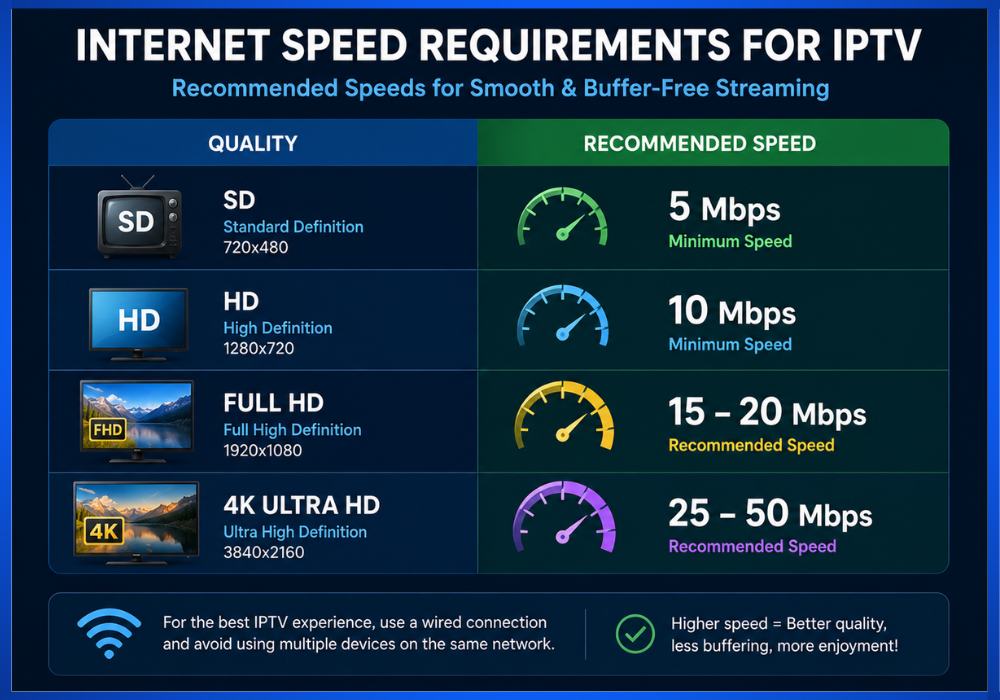
Internet speed plays an important role in IPTV performance, but you don't always need extremely fast internet to enjoy high-quality streaming.
The right speed depends mainly on the video quality you're watching.
Recommended Minimum Internet Speeds
Streaming Quality Recommended Speed
Standard Definition (SD) 5 Mbps
High Definition (HD) 10 Mbps
Full HD (1080p) 15–20 Mbps
4K Ultra HD 25–50 Mbps
These recommendations assume that IPTV is the primary activity on your connection. If multiple people are streaming, gaming, or downloading files simultaneously, you may need additional bandwidth.
Speed Isn't Everything
While download speed is important, other factors also affect IPTV performance:
- Connection stability.
- Low latency.
- Minimal packet loss.
- Reliable router performance.
A steady connection often delivers a better experience than a faster connection that frequently drops or fluctuates.
Devices Used for IPTV
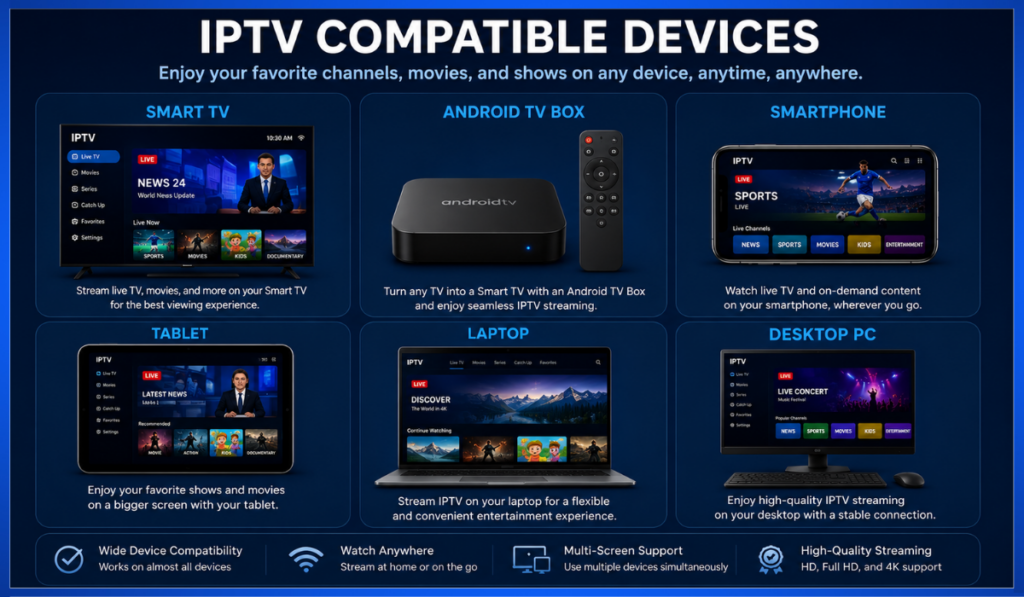
One of IPTV's greatest strengths is its compatibility with a wide variety of devices.
As long as your device has internet access and supports an IPTV application, you can usually stream your favorite content.
Smart TVs
Many modern Smart TVs include built-in app stores where you can install IPTV players directly, making it easy to enjoy content on a large screen without additional hardware.
Streaming Devices
Dedicated streaming devices are popular because they're affordable and simple to use. Common options include:
- Android TV boxes
- Streaming sticks
- Media players
These devices connect to your television and provide access to IPTV apps.
Smartphones and Tablets
Android and iOS devices allow users to watch IPTV almost anywhere with an internet connection. This portability makes them ideal for travel or watching content on the go.
Computers and Laptops
Windows PCs and Mac computers can stream IPTV through compatible applications or supported web browsers, making them convenient for users who prefer larger displays without using a TV.
Gaming Consoles
Some gaming consoles support IPTV through media applications or web-based solutions, although compatibility varies by platform and software.
Which Device Is Best?
The best device depends on your viewing habits:
- Smart TV: Ideal for home entertainment.
- Streaming device: Great for upgrading older televisions.
- Smartphone or tablet: Best for watching while traveling.
- Computer: Convenient for multitasking or office use.
No matter which device you choose, a stable internet connection remains the key to smooth IPTV streaming.
Frequently Asked Questions (FAQ)
Does IPTV Require the Internet?
Yes. IPTV delivers television content through an internet connection. Without internet access, IPTV services cannot stream video to your device.
Is IPTV Better Than Cable TV?
It depends on your needs. IPTV often provides greater flexibility, access across multiple devices, and features such as Video on Demand. Traditional cable TV may be preferred in areas with limited or unreliable internet connectivity.
Can I Watch IPTV on Multiple Devices?
Many IPTV providers support multiple devices, but the number of simultaneous streams depends on your subscription plan. Always check your provider's terms before sharing an account.
Why Does My IPTV Keep Buffering?
Buffering can occur due to slow internet speeds, unstable Wi-Fi, network congestion, or overloaded servers. Improving your home network and choosing a reliable IPTV provider can often reduce buffering.
Can IPTV Stream in 4K?
Yes. Many IPTV services support 4K Ultra HD streaming, provided the content is available and your internet connection and device meet the necessary performance requirements.
Do I Need a Smart TV for IPTV?
No. While Smart TVs make IPTV convenient, you can also watch IPTV on streaming devices, smartphones, tablets, laptops, desktop computers, and other compatible hardware.
Conclusion
IPTV may seem complex at first, but its core process is surprisingly straightforward. When you press Play, your device sends a request through the internet, the IPTV server verifies your access, prepares the content, and streams it to your screen in small data packets. Your IPTV player then assembles those packets into smooth, continuous video.
Understanding concepts such as internet connections, IPTV servers, content delivery, streaming protocols, buffering, and supported devices helps you make informed decisions when choosing an IPTV service. It also makes it easier to troubleshoot common issues and improve your overall viewing experience.
Whether you're watching a live sports event, catching up on the latest news, or enjoying a movie from a Video on Demand library, IPTV combines flexibility, convenience, and modern streaming technology to deliver entertainment wherever you have a reliable internet connection.
As IPTV continues to evolve, its features and performance are likely to improve even further, making it an increasingly popular choice for viewers around the world.